Friday, 9 January 2015

Third party cannot hear Caller's voice Problem in Audio ic Chipset

Third party cannot hear Caller's voice Problem in Audio ic Chipset

Heloo gadget freak, never experience your caller's voice calling could not hear fitting time? or other person can not hear your voice, well let's first check the following review, maybe you can find a solution it
When a person calls can not hear the caller's voice through the speaker and the speaker phone hearing, and could not hear the music through the speakers, also the sound can not be heard by someone who received a call
the Solution:

1. Make sure that your iPhone is not installed headsets, headphones, or adapter.
2. Make sure the Ring / Silent switch does not switch to silent mode
3. Try riding down Volume button,
4. Check the headset jack. If there is an object lodged in the headset jack iPhone
5. If there is debris light, such as fiber, the headset jack, try connecting a pair of headphones into the headset jack and then remove the headphones. Repeat this several times to remove impurities.
6. If the iPhone agan use a screen protector screen protector pastiin top nutupin ga speaker holes (mesh receiver) as shown below, usually buy the new iPhone there is a kind of plastic that coats the screen protector iPhone front
7. Check the mesh receiver (which is located at the front of the device, at the top of the screen). If appears blocked, use a clean brush, small, dry, soft-furred carefully and gently brush any debris.
8. If agan use Bluetooth headset that is nearby, either use the headset or turn off Bluetooth (select Settings> General> Bluetooth).
9. try restarting the iPhone.
10. If restarting the iPhone can not, try to restore the iPhone
11. If the problem persists, it means there is damage to your iPhone Audio ic Chipset on your logicboard hardware problem, to further can contact us zapplerepair for 83888781 service / repair.

source: http://zapplerepair.com/Third-party-cannot-hear-Caller-voice-Problem-Audio-ic-Chipset.html

How to Replace an iPhone 6 plus Lcd Sparepart

How to Replace an iPhone 6 plus Lcd Sparepart


Video service replacement iPhone 6 plus Lcd Sparepart


Technical things that need to be learned absolutely nothing because it was too basic and for things like complete screwdriver opener iPhone iPad Macbook one set can be purchased in zapplerepair special screwdriver for Apple iPhone iPad Macbook that can be used anywhere at price of 15 SGD only. Oyah if you want to purchase iPhone lcd 6 plus to zapplerepair iPhone replacement spare parts and chipset, For Amazing service please contact us on Zapplerepair 83888781
source: http://zapplerepair.com/How-to-Replace-iPhone-6-plus-Lcd-Sparepart.html

What should I do if iPhone iPod iPad get water damage

What should I do if iPhone iPod iPad get water damage


First I should explain that there are no gadgets like water, teach regulations to do iPhone iPod iPad get water damage. I recalled the first incident to test waterproof smartphone was with Fujitsu F-06D when first launching in Japan in 2011 at a price of 65000 yen ... in Suntec Koi pond i recorded nice videos for about 50 secs, After that the smartphone turns itself off after 3 days. There also another case where i went out sailing to see dolphins recently, there are many possibilities for iPhone iPod iPad splashed by Water because almost everyone there does not have any protection on their smartphone.
Why is smartphone need 3 days before many problem start? was due to corrosion takes approximately 2-3 days to make the motherboard inside be short circuit sometimes faster. In this time immediately take it to a reliable technician who can open and clean corrosion in the iPhone iPod iPad get water damage. Please dont think waiting will solve the problem as it will get worse not better.
In addition, these three things must be done:
1.If you have the screwdriver try to remove the battery of your iPhone and that iPod / iPad release the connector (for waterproof phones like Sony Xperia Z Series waterproof immediately go to step 3 because it is difficult to DIY open it) from logicboard to the battery
2.Clean all visible water on the outside and shake iPhone iPod iPad get water damage leads to the bottom of the docking or speaker
3.Use rice grain for about one hand grip into the plastic to eliminate moisture in the iPhone iPod iPad get water damage overnight
After this iPhone iPod iPad get water damage or iPhone iPod iPad splashed by Water usually just need to replace the battery, cleaning or LCD. Rice grain is important so you can wait for a few days without worrying about corrosion. The most important thing is please do not try to keep turning it on after realising there is some problem after step 3.
The Future problem of iPhone iPod iPad get water damage:
1. Capacitor on the logicboard still work well but they may discharge wrong current which lead to noise or instability
2. Corrosion can make electronic route dissapear which mean there is no connection at all, for this problem there is only one solution which is panji the motherboard
if you tired and give up faced this problem, we can help you fix this just bring your iPad iPhone to our Workshop and we'll fix that, or call 83888781 for amazing service

source: http://zapplerepair.com/iPhone-iPod-iPad-get-water-damage.html

iPhone 6 Wifi and Bluetooth Grey Restart

iPhone 6 Wifi and Bluetooth Grey Restart


Since the launch of the iPhone 6 in the world we receive many complaints iPhone 6 Wifi and Bluetooth Grey Restart after 5 ~ 10 minute its going to restart itself as for the iphone 6 Wifi slow and often drop solutions from the internet about this issue has been tried but no use, it turns out this is Apple's product manufacturing error.
It reminds me of the iPhone 4S Wifi which is similar to the iPhone 6 they have a problem in wifi chipset that needs to be replaced. I think for people who have not bought an iPhone 6 should wait for the latest release from Apple in order to get the better Wi-Fi chipset. The problem I'm sure Apple is now probably already know they will follow the iPhone 4S Wifi problem where the wifi chipset made into thinner and more heat resistant than the previous wifi chipset first and second batch output.
Why can iPhone 6 Wifi slow and often drop? Due to the electronic routing to transmit data between the CPU to the chipset wifi has an overheat problem and it iPhone 6 frequently drop wifi signal because the wifi chipset has some foot on the chipset for grounding when the heat cause the foot to loosen it will drop out if it is on the important transfer or power data but if it is just loosen on the ground then still can be used but iPhone 6 wifi weak or iphone 6 Wifi slow and often drop.
Call us at 83888781 for Amazing service

source:
http://zapplerepair.com/iPhone-6-Wifi-Bluetooth-Grey-Restart.html

iPhone 5 6 6+ Power On/Off Button not Working or Sensitive

iPhone 5 6 6+ Power On/Off Button not Working or Sensitive


Since iPhone 5 launch a few months back, many people are saying the battery will have problems like the previous model iPhone 4 and 4S but it is not the case. Opening iPhone 5 remind me of iPHONE 3G, their flexicable replacement is very similar :)
The most problematic parts in iPhone5 is the iPhone 5 6 6+ Power On/Off Button not Working or Sensitive and you cannot do anything about it except keep using the assertive touch which is not convinient at all. Even on the Second month of the launching already people coming into our store replacing the Power on off flexicable.
Here we will teach you how to change the Power on off flexicable, so please prepare a - minus, pentalo, + plus screw, sucker, pinset and lastly ofcourse the sparepart of a new iPhone 5 Power On/Off Flexicable which you can get from Zapplerepair Spareparts Store
Step by Step after opening the lcd and taking out the motherboard of iPhone 5:
1. remove the volume bracket, silent bracket and vibrator. Then slowly proceed with the power button which has one metal bracket hinge one screw and one side clinging to a pole
2. take out slowly the old flexicable so you can use it again incase the new one spoilt
3. putting the new flexicable is same from volume > silent > vibrator > power button, please be careful of scratching camera plastic by your pinset
Some people have problem once the hinge hang on the rightside pole supporting the power button came out, dont know how to put it back? this is not easy but once you know the way of putting, it is very simple. The hinge need to be insert from left to right with the moon curve facing down then dont close it as you need to insert the Power on off flexicable just align the hole on the Power on off flexicable to the hole just below the button so everything will be perfectly fit in.
if you tired and give up faced this problem, we can help you fix this just bring your iPad iPhone to our Workshop and we'll fix that, or call 83888781 for amazing service
source:
http://zapplerepair.com/iPhone-5-6-power-on-off-button-not-working-sensitive.html

Wednesday, 7 January 2015

iPhone 5 6 6+ iPad Mini Lightning usb Problem

iPhone 5 6 6+ iPad Mini Lightning usb Problem

Since the launching of iPhone 5, it already have iPhone 5 lightning usb docking spoilt with the charging problem which eventually solved by changing the lightning usb docking and it work fine again until recently (update 23 12 2014) we have even greater problem, over time these iPhone 5 logicboard actually failling by themselves. Some of the problem related to iPhone 5 lightning usb ic controller on the logicboard is:
1. iPhone 5 restarting in apple logo 
2. iPhone 5 when charging cannot full (could be PMIC problem as well)
3. iphone 5 died because there is no power going to Cpu
Currently in Singapore only a few people that actually know how to change the iPhone 5 lightning usb ic controller chipset and the repair is risky as the posisition of the chipset is just below the main Cpu so if the repairman not careful enough he may spoilt the Cpu.
Why iPad mini lightning usb spoilt:
1. Rough usage which cause the metal plate to wear and tear
2. High power inserted to the iPad mini which cause the controller circuit on the flexicable iPad mini lightning usb to fail
3. Inexperience way of dismantle of the iPad mini logicboard by newbie technician
How to solve the problem is pretty simple for the iPad mini lightning usb spoilt:
Problem no 1: change the whole flexicable lightning usb but look for technician that know how to solder properly
Problem no 2: simple jumper from the lightning usb to the logicboard
Problem no 3: dont let new technician to open the logicboard from the bottom always take out the logicboard from the top, since he can spoilt the lightning usb flexicable he will also spoilt the lcd especially if the iPad mini comes with 4G because of the tape to the antenna, careful guys.
Article About iPad iPhone Original usb Lightning cable
How to differentiate between iPad iPhone Original usb Lightning cable and the fake one?
iphone usb cable plastik
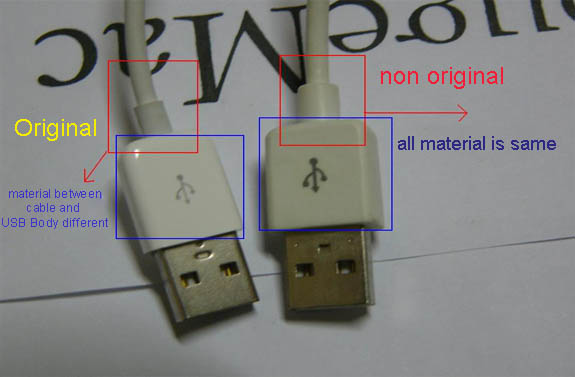
Picture 1 Which one is the original Apple usb lightning cable's plastic?
kepala iphone usb kabel
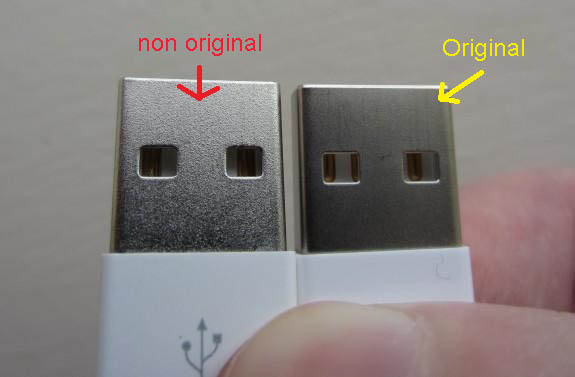
Picture 2 Head of the usb lightning cable the Real dan the Fake
The defference between the original and the fake especially grade A is quite hard to notice from outside but i am going to teach you insider trade. Firstly most of Singapore shop other than the authorized one, they are selling the grade A which mean the head has the original chip so that while connecting to itune or power supply you will not have the fake errors in your iPad iPhone but they are using lower grade material like:
1. Plastic of the Fake iPad iPhone usb lightning cable is hard and not so elastic, which one of the above 3 is the original one? get your answer below these article
2. The Original iPad iPhone usb lightning cable the aluminium head is not shiny
USB Port iPhone 5
Picture 3 Head USB Port iPad iPhone Original and fake lightning Cable

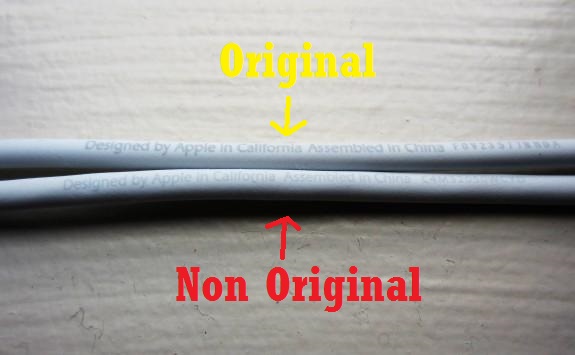
3. If you notice there is serial no below the marking made in China designed by Apple on every cable for the iPad iPhone Original usb Lightning cable and they are not the same if you borrow another cable and they have the same serial no then you know it is fake. Another way is by the color and the wording because the fake one is slightly lighter and blurry
USB Port iPhone 5
Picture 4 Wording Serial Number iPhone Original and Fake lightning Cable
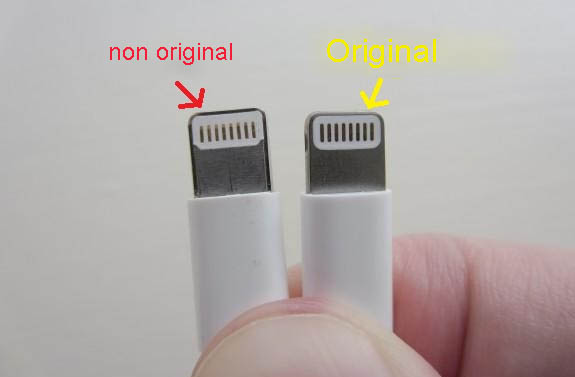
4. Look carefully at the USB Head, the hole in the USB head for the fake one is slightly rounder while for the original one is more to a square
USB Port iPhone 5
Picture 5 Lightning Port iPhone 5 Original dan Fake
merawat cable usb
Picture 6 Cable head warped around a Celotape
For long time usage and protection from animal, we would suggest people to warp both end of your cable so it will last longer and save your extra money for better usage :) that all from us last thing if want to get real iPad iPhone Original usb Lightning cable call us at 83888781
Article for the less Geeky Problem on iPhone 5 lighting charging port


iPhone 5 is latest model iPhone from apple now, there is much different specification with other model iphone, and iPhone 5 have small charging connector which they called the lightning version that is the same with iPad mini, so you cannot use another old iPhone cable charging on iPhone 5. Most problem oniPhone 5 is sometime cannot charging and not connect to iTunes or maybe can charging but not connect to iTunes.
If your iPhone 5 won't charge, it may be time for a new battery (and, since the iPhone's battery can't be replaced by the average user, you'll be paying for that service along with the battery itself) and the most problematic one is on iphone 5 lightning charging port. There are 5 things that could be interfering with your iPhone's ability to charge its battery. Try these things before you head out to replace your iPhone 5 battery.
1. Check For Lint
This isn't a super common problem, but it's possible that lint from your pockets or purse could be jammed into either the iPhone 5 dock connector or your USB cable. If there's enough lint there, it could be preventing the hardware from connecting properly and thus stopping electricity from reaching the iPhone 5 battery. Check your cable and dock connector for gunk. If you find it, a shot of compressed air is the ideal way to clear it, but blowing will also work./
2. Don't Charge Using the Keyboard
If your iPhone 5 won't charge, you need to make sure you're charging it in the right place. Because the iPhone 5 has high power demands, it needs to be charged using high-speed USB ports. The USB ports that are included on many keyboards don't provide enough power to charge the iPhone. So, if youriPhone 5 doesn't seem to be taking the charge, make sure it's plugged directly into one of your computer's USB ports, not the keyboard.
3. Check USB Port
Once you know you're using the right kind of USB port, if you still can't get a charge, it may be the USB port itself that's broken. To test this, try plugging your iPhone into another USB port on your computer (or on another computer if you have one nearby). If that other computer recognizes your iPhone, the USB ports on your computer may be broken.

You can also try plugging in another USB device that you know for sure works. That can hep you rule out that the problem is with your USB ports.
4. Check USB Cable
On the hardware malfunction front, it's also possible that there's a problem with the USB cable you're using to connect the iPhone to your computer or power adapter. The only way to test this is to get access to another iPhone 5 lightning cable and try using that one instead. If you find that it is your USB cable that's broken, you can buy a new one from many stores.
5. Check Wall Charger
If you're charging your iPhone using a wall charger power adapter (rather than by plugging it into your computer), it could be the adapter that's preventing your iPhone from charging. Just like with the USB cable, the only way to check this is by getting another power adapter and trying to charge your phone with that. Ideally you can borrow one, but if you need to buy a new one, there are lots of options.
6. You've Got a Dead Battery
Now the truth almost certainly is that your iPhone 5 won't charge because its battery is dead and needs to be replaced. It's worth remembering, too, that if your iPhone is less than one year old, or if you have AppleCare, battery replacement is covered for free. Look out for Free Apple iPhone 5 replacement program!
7. You are in Trouble as it is the Logicboard problem
If none of those things work, the problem is divided between 80% Power management IC chipset on your logicboard spoilt and 20% is the Cpu problem.
if you tired and give up faced this problem, we can help you fix this just bring your iPad iPhone to our Workshop and we'll fix that, or call 83888781 for amazing service

for more info visit:
http://zapplerepair.com/problem-iphone-5-charging-usb-lighting.html

Apple iPhone, iPad, Mac, etc. Authorized Service Centres Provider in Singapore

 Apple Authorized Service Centres in Singapore


WHEELOCK PLACE, 501 ORCHARD ROAD, #05-13/14
SINGAPORE 238880
+65 6555 0500

A.LAB@CCP is located on level 1 in Changi City Point Mall opposite Expo MRT station.

5 Changi Business Park Central 1
#01-55 Changi City Point
Singapore 486038
11 AM to 9 PM daily
Telephone: 65.6784 1318
(Mon-Fri: 9 AM to 6 PM)
Fax: 65.6784 7626
E-mail: a.lab@alab.sg


A.LAB@PS is on level 4 at Plaza Singapura
above Dhoby Ghaut MRT station.

68 Orchard Road
#04-12B Plaza Singapura
Singapore 238839
Mon-Sat: 11 AM to 7:30 PM
Sun: 10 AM to 2 PM
(Collection till 7:30 PM)
Telephone: 65.6784 1318
(Mon-Fri: 9 AM to 6 PM)
Fax: 65.6784 7626
E-mail: a.lab@alab.sg

PLAZA SINGAPURA, 68 ORCHARD ROAD, #04-12B
SINGAPORE 238839
+65 6784 1318

Blk 19, Kallang Avenue,
#07-153
Singapore 339410
Tel: 65 63934776/62999433
Fax: 65 62913912
Email: apple.service@ecs.com.sg
Web: http://www.ecs.com.sg
Services Offered: Portables, Desktop Operating hours: Mon Friday : 9am - 6pm Closed on Public Holiday and Sunday 

No. 42 Tannery Lane, Level 6 (Gleason Building)
Singapore 347791
Main Line: (65) 6742-0877
Mobile Phone: (65) 9863-7558
Operating Hours:
Monday to Friday - 8:30 AM to 7:00 PM
Saturday - 8:30 AM to 1:00 PM


i hope this will help you to find Apple Service Center :)

if you have problem with your iGadget you can contact us Hotline: 838888781 we will give you amazing service :)
or you can email us : zapplerepair@gmail.com

visit our website :
www.zapplerepair.com